How to pay for the WhatsApp API in reais, not dollars: step by step
If your WhatsApp Business account (official API) is being charged in US dollars, you can switch to paying in Brazilian reais (BRL) by adding a payment method in reais to the account itself. It takes a few minutes and is explained below, with a screenshot of each screen.
The short answer
To pay in reais, go to WhatsApp accounts → Payment settings → Payment methods, click Add, change the currency from US Dollar to Brazilian Real, enter the card, continue and set this payment method as the default.
Before you start: you need admin permission on the business portfolio and on the WhatsApp account. If the Brazilian Real option doesn’t appear, or the card can’t be used on the account, its currency may be locked by Meta. In that case, check with Meta or with the provider (BSP) responsible for the account. See also what to check about BRL billing.
Why switch from dollars to reais
- Predictability: Meta’s rates for Brazil are published in reais. With the account in BRL, the invoice follows the rate card, without depending on that day’s dollar exchange rate.
- Less currency conversion on the card: charges in dollars usually go through a currency conversion by the card issuer, and the final amount in reais can vary from one invoice to the next.
- Simpler reconciliation: the finance team compares the invoice in reais with the volume of messages sent, without converting currencies.
Step by step
The screenshots show Meta’s interface in Portuguese. Next to each button name, the label you will see in the screenshot appears in parentheses.
1Open WhatsApp accounts in Meta Business Suite
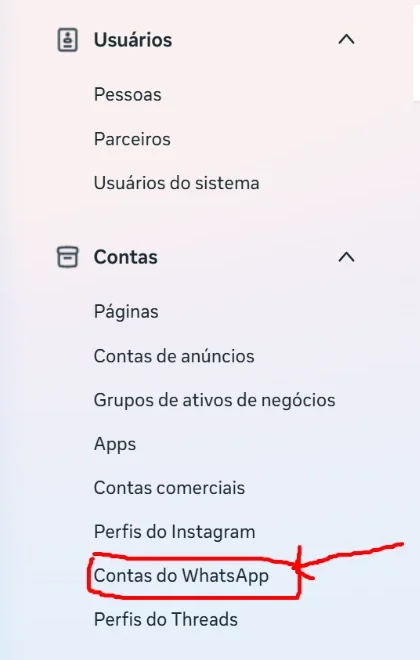
Go to Business portfolio settings. In the side menu, open Accounts (Contas) and click WhatsApp accounts (Contas do WhatsApp).
2Choose the account and click “Payment settings”
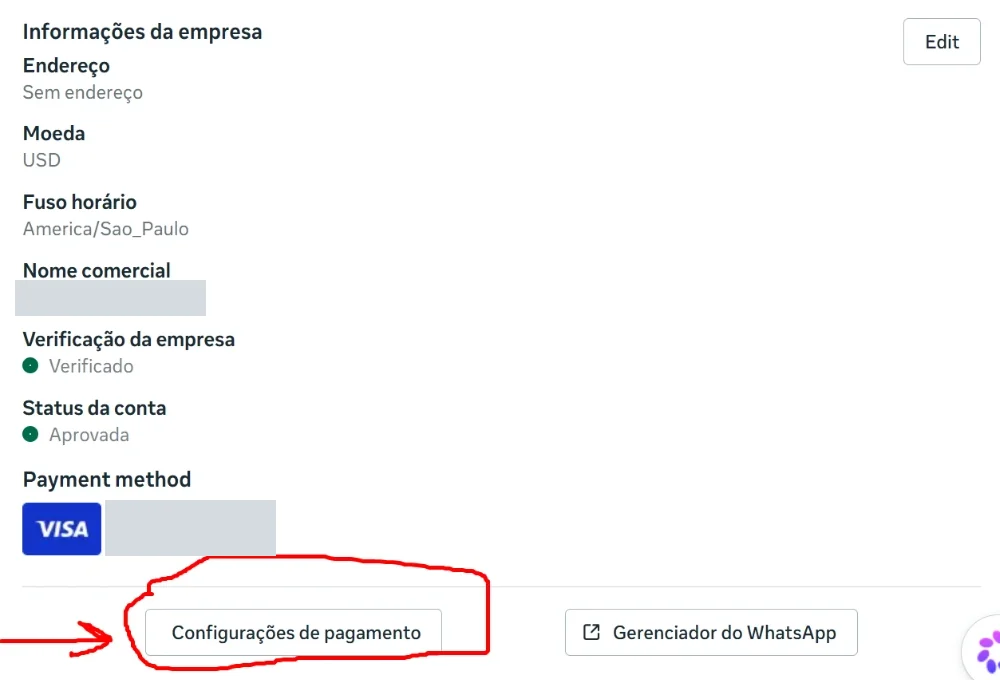
Select the WhatsApp Business account (WABA) that sends the messages. In the account summary, look at the Currency field (Moeda): if it shows USD, the account is being charged in dollars. Click Payment settings (Configurações de pagamento).
3Open “Payment methods”
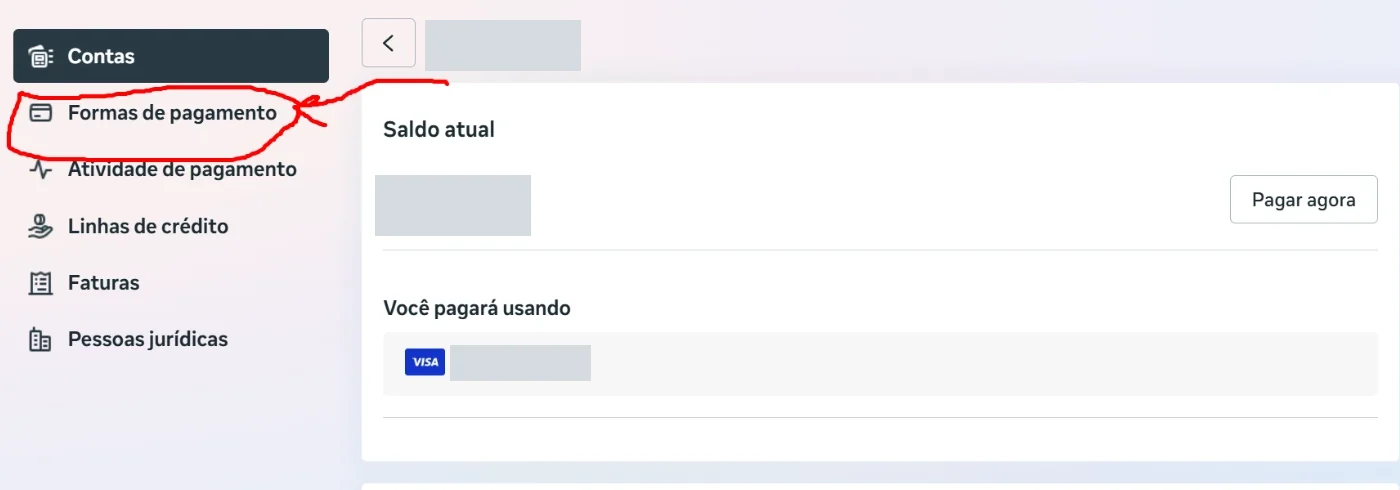
On the Billing & payments screen (Cobrança e pagamentos), click Payment methods (Formas de pagamento) in the left-hand menu.
4Click “Add”
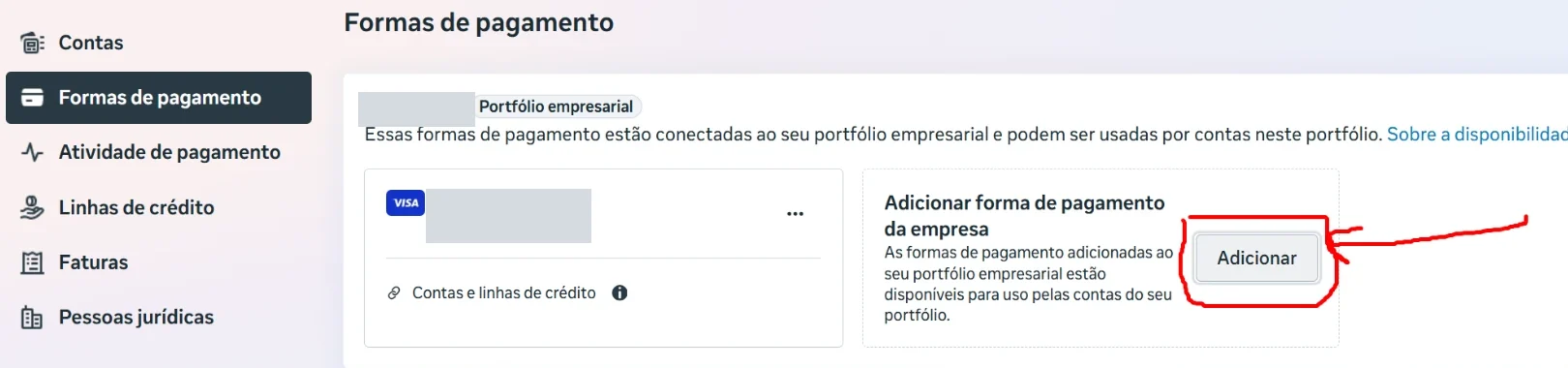
Under Add business payment method (Adicionar forma de pagamento da empresa), click the Add button (Adicionar).
5Change the currency to “Brazilian Real” and continue
In the Add payment details window (Adicionar dados de pagamento), keep Brazil as the country and open the Currency field, which is set to US Dollar by default. Choose Brazilian Real (Real brasileiro), enter the card and click Next (Avançar).
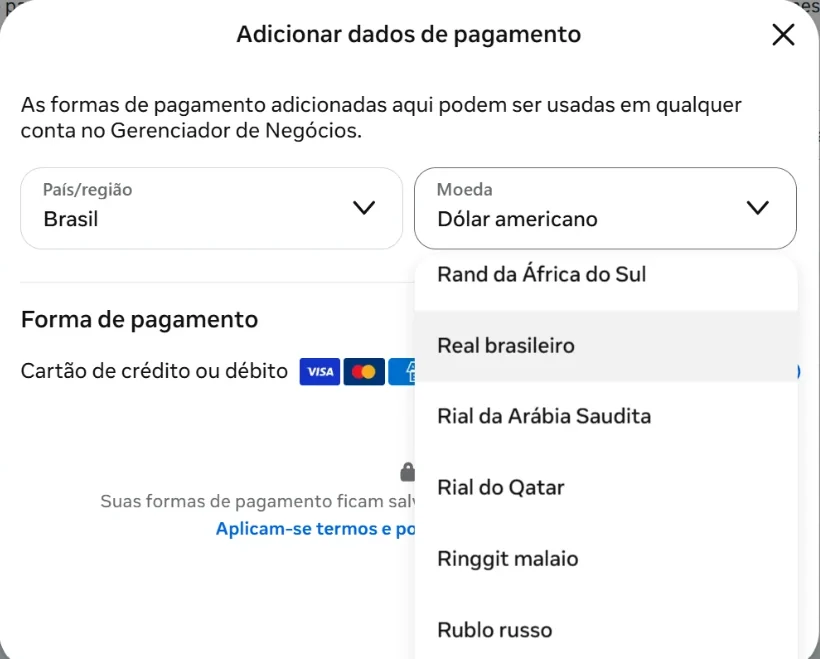
6Set it as the default payment method
Once it is saved, the card in reais appears in the account’s list of payment methods. Click the three dots (…) next to it and choose Set as default (Definir como padrão). The Default tag (Padrão) is what makes Meta start charging this card instead of the dollar card used before.
Want to check that it worked? Go back to the account summary (step 2). The Currency field should show BRL, and the next invoices will appear in reais. Charges already issued in dollars stay as they were generated.
How much you pay per message in reais
With the account in BRL, a marketing message to a Brazilian number costs R$ 0.3217 per delivered message, according to Meta’s rate card effective October 1, 2026. The other categories have a lower rate, as the table shows:
| Category | Reference rate |
|---|---|
| Marketing | R$ 0.3217 |
| Utility, authentication and service | R$ 0.0350 |
The full explanation, with what the rate includes and what it doesn’t, is in the guide How much does the official WhatsApp API cost in Brazil? To estimate volumes, see what 1,000, 5,000 and 10,000 marketing messages cost.
Common questions
The “Brazilian Real” option doesn’t appear. What now?
Meta decides, account by account, which currency billing is available in. If the option doesn’t appear, the account may already be tied to the dollar. Check with Meta or with the provider (BSP) that manages the account before you try again.
Can I keep the dollar card on file?
Yes, but charges go to the payment method set as the default. That is why the last step matters.
Does the change affect the price Meta charges per message?
No. The invoice currency and the per-recipient rate are separate matters. The rate depends on the message category and on the recipient’s country.
Official source and reference date
This step by step describes the interface as it appeared on October 10, 2026. Screens, button names and eligibility rules are set by Meta and may change. MeContaí does not manage the customer’s billing account.
Check the official source:
→ WhatsApp Business Platform pricing — Meta documentation
Reference date for the information on this page: checked on October 10, 2026.
Newsletter · every Tuesday
Get articles like this one in your inbox
One issue a week on everyday retail topics. Each topic comes with a summary and a link to the full article.
Want to know whether the official API makes sense for your operation?
The diagnosis looks at what you need for customer relationships, post-sale follow-up, reactivation and consent-based marketing on WhatsApp. It is not an instant quote, nor a confirmation of Meta’s rates, currency or billing eligibility. It is the starting point for an informed conversation.
Request a diagnosis of my operation
Prefer to talk now? Start a conversation with the MeContaí team directly on WhatsApp.
Chat on WhatsApp